AndroGochi
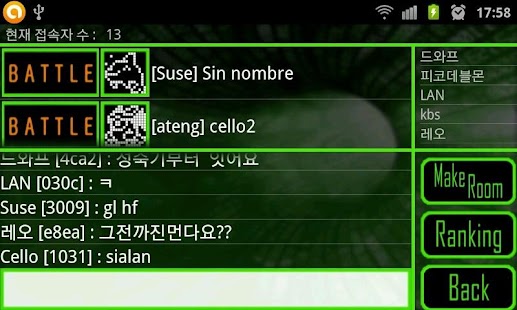
Furthermore, you can battle others all over the world a la the old school digimon style.
If you set wizet, you can watch your pet in your smartphone's background.
You can raise 213 pets.
Which will you choose?
I hope you enjoy your time with your pets and, perhaps, reminisce about the nostalgic moments of the nineties.
** INSTRUCTIONS FOR USE : Access button- on Android devices one of the buttons that is not associated with the Androgochi program on the bottom of your screen is the "Menu" button.
It looks a bit like little files.
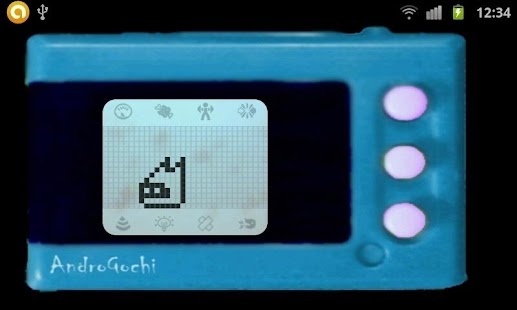
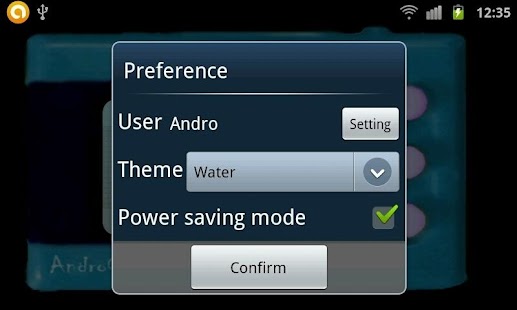
This button will bring up a screen that allows you to choose a name for yourself and pick a style for the game display. Scale Icon: Viewing pet's status you will see numerous screens. Feeding: There are two options here.
The top selection is a piece of meat which will decrease the pet's Hunger and fill it's hunger bar.
The second selection is the Vitamin Pill, which will increase your pets strength and energy. Training: This is where your pet will train for battle.
There are three different ways to train-1- Classic- This training excersize is about building attacks to full power.
You will see a percentage rise from 0 to 100 by 10s.
When the power level reaches 100% press the top button of your device and release the attack.
A full power attack will destroy the rock target.2- Shake- Usefull for practicing for battlenet battles.
As you select this option the screen will say "ready" and then "COUNT".
Carefully and with a firm grasp on your device (safety first!) shake your device evenly from side to side from 2-10 times.
Each evolution requires a different number of shakes to reach full power.
Full power will create five rounds of double projectiles for maximum damage.3-Search- This practice mode allows you to fight virtual opponents hidden in barcodes.
These fights will mimic the battlenet fights agains live opponents.
After chosing the Search option you will see the screen say "ready", and then "COUNT".
Shake as you would in a battlenet fight and as previously described in the "shake" section.
Your device will then turn on it's camera for scanning.
Place a clean barcode in front of it and allow the device to find your opponent.
The screen will flash the word "battle" and then the fight will commence as described below. Fighting: This will allow you to fight another pet and their trainer over the Worldwide Battlenet to increase your Win Ratio.
Toilet: This will flush the screen clear when your pet leaves you a little present approximately every 3 hours.
Lights: Select this option to turn the lights off when your pet is sleepy.
You must do this within 20 minutes (or before the 'shout' light goes out), or it will count as a care mistake. Bandage: This is where you provide medical attention for your pet.
Sometimes your pet will refuse the treatment, and you must keep selecting the option until it is happy again.
The "shout" icon: When it's lit up you have 20 minutes to respond before it goes out or you will get a care mistake.
Your pet will only do this when all its hearts in one need have run out.
It will also activate when it is time to turn out the lights.
**SIMPLE EVOLUTION GUIDE
EGG(Life : 1 minute) Just waitStep 1(Life : 1 Hour) Random, Step2-A, Step2-B, Step2-CStep 2(Life : 12 Hour) Just waitStep 3(Life : 24 Hour) Tranning count > 30 : Special evolution(Random evolution to one of 26 pet) Tranning count = 9~29 , Penalty < 5 : Step4-A Tranning count = 9~29 , Penalty > 4 : Step4-B Tranning count < 10 , Penalty < 5 : Step4-C Tranning count > 9 , Penalty > 4 : Step4-DStep 4(Life : 72 Hour) Battle 10 times at least, need high winning ratesStep 5(Life : 96 Hour) If this step has next evolution, will be that
About AndroGochi
- Package name (App ID)
- bulzipke.AndroGochi
- Available on
- Google Play
- Price
- Free
- Version
- v3.12
- Developer
- Kizi Games
Looking for the AndroGochi APK?
The safest way to get AndroGochi (bulzipke.AndroGochi) on your Android device is to install it directly from Google Play — you'll always get the latest official version, automatic updates, and no risk of modified or infected APK files from third-party sites.
Gaming Features
Enjoy immersive gaming experience with various game modes.
Camera Features
Advanced camera features with editing capabilities.
Food & Dining
Discover recipes and order food from your favorite restaurants.
See AndroGochi in Action
Frequently Asked Questions
Is AndroGochi free?
Yes, AndroGochi is free to download and install on Android through Google Play.
How do I install AndroGochi on Android?
Open Google Play on your Android phone or tablet, search for AndroGochi by Kizi Games or tap the Google Play button on this page, then tap Install. The app downloads and installs automatically.
What is bulzipke.AndroGochi?
bulzipke.AndroGochi is the App ID (package name) of AndroGochi on Google Play. Every Android app has a unique package name, and it is the safest way to verify you are installing the official app.
Is AndroGochi safe to download?
Installing AndroGochi from Google Play is the safest option: you get the official version published by Kizi Games, verified by Google Play Protect, with automatic updates. Avoid APK files from unofficial third-party sites.
Get AndroGochi Today
AndroGochi for Android — free download on Google Play.
Compatible with Android phones and tablets — available on Google Play.
Ask AI about this app
Get instant answers about features, tips and more from popular AI assistants.